
You are viewing this page as an ad destination.
Maister

Free guide

Put Claude to Work

Fifteen copy-paste prompts that turn Claude from a blank chat into a colleague who knows your background, your goals and the way you work.

Free guide Put Claude to Work 15 copy-paste prompts that turn Claude into a colleague who knows your work. Maister
9 chapters
Freeall 9 chapters

Free guide

Read all nine chapters, free.

Tell us where to send it and every chapter opens straight away, on any device. We update the guide regularly, because AI tools and features change quickly.

You’re already in

Every chapter is open to you.

Start reading See the contents

Get the guide

Where should we send it?

Your email joins our list. One email a month on what changed in the tools and what we built. Unsubscribe any time.

Check your inbox

All nine chapters are open.

We have also emailed you the link, so you can pick the guide up on any device.

Start reading

who this is for

Written for people who already have the subscription and still open a blank chat.

You use it every day

Every conversation starts from nothing.

You re-explain your business five times a week.

You tried it once

The answers sounded like a brochure, so you stopped.

It was never told who you are or how you talk.

You are setting it up for others

Two people get remarkable answers. The other six do not.

Nobody has written down how to ask.

contents

Nine chapters, all of them free.

Twenty to thirty minutes each. One sitting, or one chapter at a time — it remembers where you stopped.

  1. Welcome to ClaudeRead it hereClaude’s five building blocks, and the order to set them up in.
  2. Introduce yourself to ClaudeP1A reusable 250-word “About me” profile, built through an interview with Claude.
  3. Set your goalsP2Three dated, measurable priorities in “My goals”.
  4. Set how Claude works with youP3 · P4Your working rules, and your context consolidated into one place.
  5. Organise your work and life with ProjectsP5 · P6A map of your projects, with a role for Claude in each one.
  6. Install and create SkillsP7 · P8Your recurring methods, applied automatically.
  7. Connect your toolsP9Drive, Gmail, Notion and the rest, connected safely.
  8. Hand Claude a real taskP10A first task completed end to end.
  9. Final checklist✓The check that everything is in place.
The guide starts here
Put Claude to WorkChapter 1 of 9Read it in the guide reader

Welcome to Claude

How to use this guide

This guide is not a course on AI. It is a hands-on workshop. Each chapter has you complete a real action in your own Claude account.

The method, in every chapter:

  1. I understand I read why it matters
  2. I copy the prompt Into a new conversation
  3. I answer Claude With concrete examples
  4. I set it up Instructions, Project, Skill, connector
  5. I move on With a concrete result in hand

What you need:

  • A Claude account (claude.ai). The free plan covers chapters 1 to 6. A paid plan (Pro or higher) is required for chapter 8 and for some connectors.
  • 20 to 30 minutes per chapter.
  • To work with files on your computer: the Claude Desktop app (Mac or Windows).

Badge key:

  • ALL PLANS: available for free.
  • PAID PLANS: Pro, Max, Team or Enterprise.
  • TO CHECK: the feature exists, but its location or limits depend on your account.

One rule for the whole guide

If Claude does not have a piece of information, it must not make it up. Every prompt in this guide tells it so explicitly.

Good to know

Features checked on 15 October 2026. Claude evolves quickly: if a button does not have exactly the same name, look for the feature in Settings.
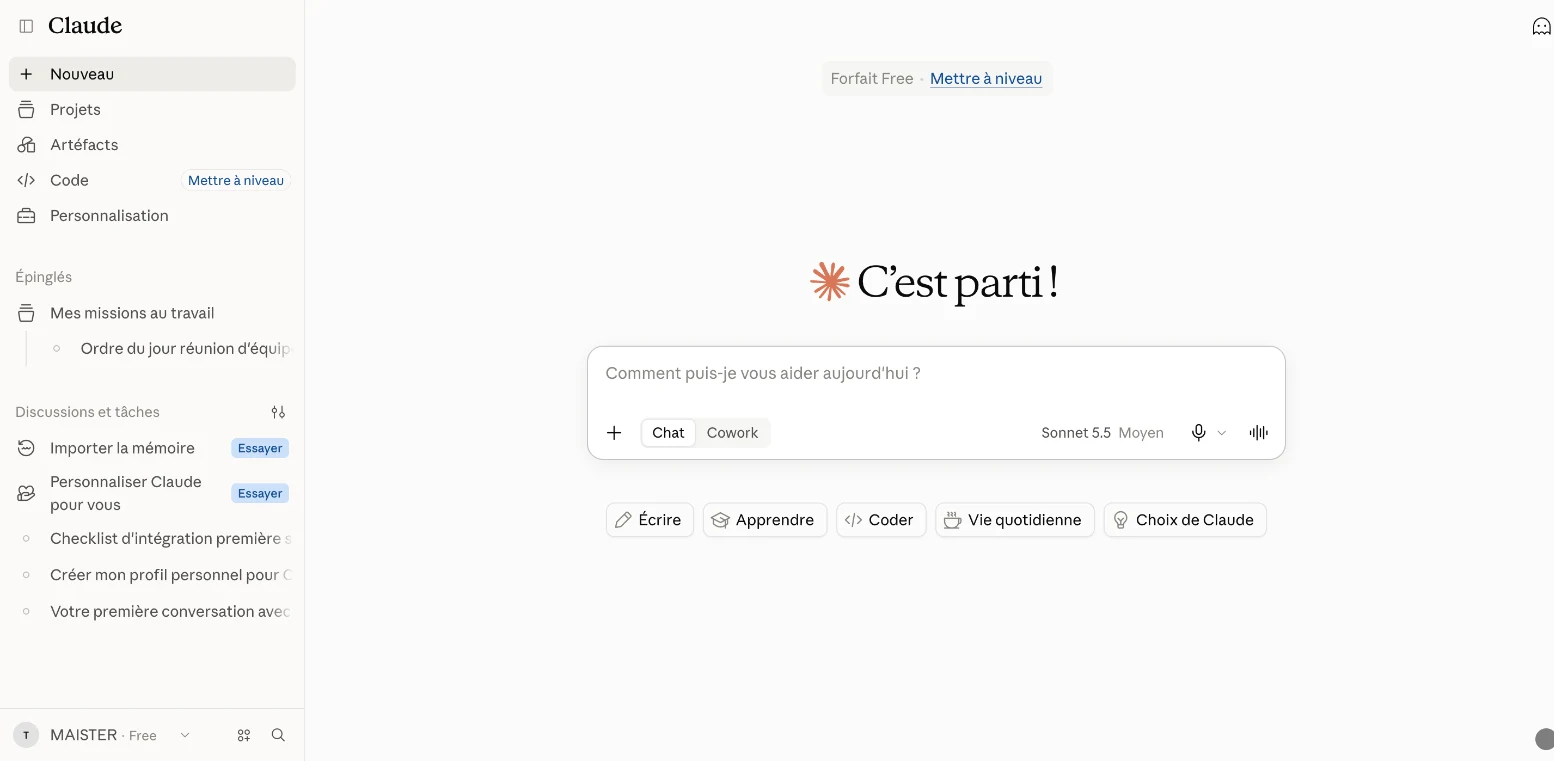
Your starting point: the Claude home screen, with the sidebar (Projects, Customize) and the input box

Welcome to Claude

What you will get

a clear view of Claude's 5 building blocks, and the order in which to set them up.

Without any setup, Claude starts from scratch in every conversation. Once set up, it knows your context, follows your rules and works with your documents.

  • CH. 02–04 · You · Profile, goals, instructions
  • CH. 05 · Projects · One workspace and one role per area of life
  • CH. 06 · Skills · Your methods, reused automatically
  • CH. 07 · Connectors · Your tools: Drive, Gmail, Notion…
  • CH. 08 · Tasks · Work done, end to end

The Claude ecosystem: each building block rests on the one before.

Building blockWhat it isWhen to use it
ConversationA question-and-answer exchangeA one-off question, a quick draft
ProjectA workspace with its own instructions, documents and a role for ClaudeA major area of your life: your job, your side hustle, your career, your health, your finances
SkillA saved method, applied automaticallyA recurring task you always want done the same way
ConnectorSecure access to your tools (Drive, Gmail, Notion…)When Claude needs to read your actual documents
Delegated taskMulti-step work completed end to endA complete deliverable: a report, a tidied folder, a briefing

Note

Since September 2026, Anthropic has been merging chat and Cowork into a single Claude, starting with the Pro and Max plans. If your account still shows a separate "Cowork" mode, chapter 8 works there too.

The setup order

  1. Your profile (chapter 2): who you are.
  2. Your goals (chapter 3): what you want to achieve.
  3. Your instructions (chapter 4): how Claude should work with you.
  4. Your Projects (chapter 5): one workspace and one role per area of your life.
  5. Your Skills (chapter 6): your recurring methods.
  6. Your connectors (chapter 7): your tools.
  7. A first delegated task (chapter 8).

Your turn

open claude.ai and find the sidebar, the Projects entry, the Customize entry, and your name at the bottom left, which opens Settings.

Chapters 2–9 · free, with an email

the rest is free too

Tell us where to send it, and all nine chapters open.

There is nothing to pay, now or later. No password to invent either — the link opens the full guide and remembers where you stopped, on any device.

Your email joins our list. We send one email a month on what changed in the tools and what we built. Unsubscribe any time.

check your inbox

All nine chapters are open.

We have also emailed you the link, so you can pick the guide up on any device.

Continue to chapter two

02Introduce yourself to Claude20–30 min 03Set your goals20–30 min 04Set how Claude works with you20–30 min 05Organise your work and life with Projects20–30 min 06Install and create Skills20–30 min 07Connect your tools20–30 min 08Hand Claude a real task20–30 min 09Final checklist20–30 min

The setup checklist downloads as a single sheet you can keep beside you. The guide itself stays online, where it can be corrected when a menu moves.

after this one

Set up? Now build something.

The obvious next thing is a website, and that guide is free too.