
What you will get
your rules saved in Claude, and a "My Claude context" document that brings everything together.
Answers too long, too cautious, too vague? Those are instructions to give Claude: once saved, they apply to all your conversations.
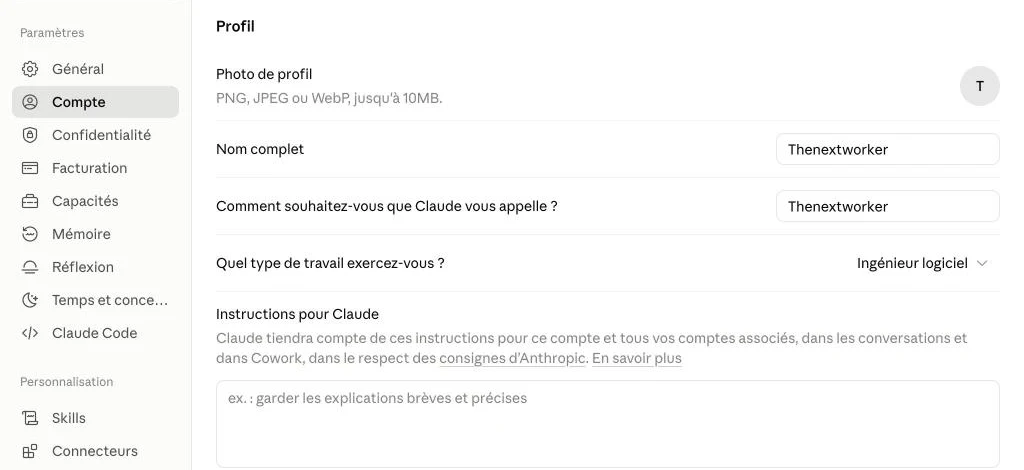
- Run P3, then paste your rules into Settings → Account → "Instructions for Claude". ALL PLANS
Prompt P3
How to work with me
What this prompt does: Claude helps you put your working rules into words.
You are going to help me define how I want Claude to work with me. The result will be a text I will paste into my instructions for Claude.

1. Ask me no more than 3 questions at a time, with example answers to help me choose.
2. Cover: language; tone; length of answers; level of detail; my preferred formats; what I expect when I ask for an opinion (clear recommendation, options, candid critique); reliability rules; the situations where you should ask me a question rather than guess.
3. Also ask me what annoys me in AI answers.

Then write:
<format>
# How to work with me
- 8 to 12 short rules, in the imperative, one per line
- Each rule is concrete and verifiable
</format>

150 words maximum. Do not add any rule I have not expressed, except this one, always on the last line: "If you don't know, say so. Never make up information."
Start with your first questions.
Your result 8 to 12 clear rules, in the imperative.
Next step Paste them into Settings → Account → "Instructions for Claude".
Real example
My working rules (excerpt)
- Get to the point.
- For a strategic question, start with the recommendation.
- Challenge my ideas when warranted, with pros, cons and a better option.
- For writing tasks, deliver ready-to-use drafts.
- Distinguish verified facts, assumptions and recommendations.
- Never make up information. Never claim to have checked a tool when you have not.
- Reply in French; amounts in FCFA by default.
- Run P4 with your three documents to get your consolidated context.
Prompt P4
My Claude context
What this prompt does: Claude merges your three documents into a 300-word context.
Here are three documents: "About me", "My goals" and "How to work with me".

<about_me>[PASTE YOUR PROFILE HERE]</about_me>
<goals>[PASTE YOUR GOALS HERE]</goals>
<rules>[PASTE YOUR RULES HERE]</rules>

1. If you spot a contradiction, flag it and ask me which version to keep BEFORE writing.
2. Merge them into a "My Claude context" document of 300 words maximum. Keep lasting facts, priorities and rules; remove anything that will have changed within a month.
3. Do not add any information that is not in the documents.

<format>
# My Claude context — updated on [date]
## Who I am (3 lines)
## My current priorities
## My constraints
## How to work with me
</format>

Then, in 5 lines maximum, explain where to save each part: the rules in my instructions for Claude (Settings → Account); context specific to one activity in a Project; and the role of Claude's memory. If you are not sure where a setting is, say so.
Your result A consistent 300-word context, with no duplication.
Next step You will paste the relevant part into each Project in chapter 5.
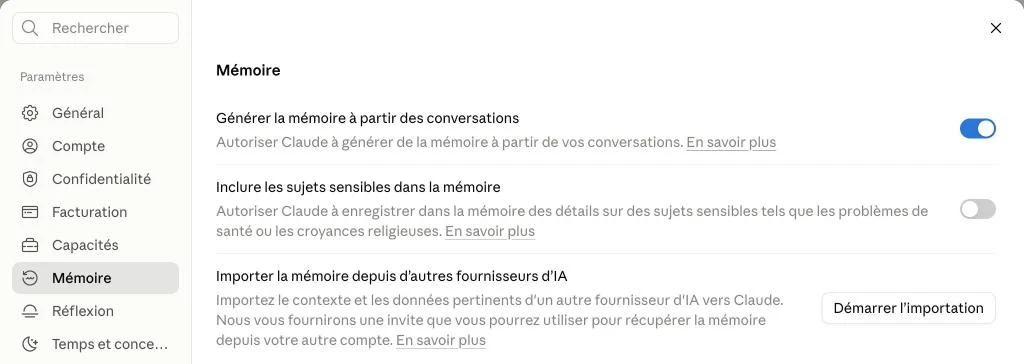
- Check the memory (Settings → Memory): this is what Claude retains from your conversations. It complements your instructions; it does not replace them.
Your turn
once your rules are pasted in, ask Claude a question you often ask it. Have the tone, length and structure changed?
Expected outcome
1 set of active instructions in Claude + 1 "My Claude context" document.