
What you will get
a map of the main areas of your life, a role for Claude in each, and a first Project set up.
ALL PLANS · Up to 5 Projects on the free plan
A Project is a workspace with its own instructions, documents and conversations. Above all, it is a role you give Claude. Your life is more than your job: each major area can have its own Project, with its own role.
Real example · How I organise my work in 2 Projects
Why separate them?
Each activity has its own documents, vocabulary and confidentiality rules. When I prepare a training programme, I do not want Claude to draw on a client's technical documentation. And when I work on a client proposal, I want it to know my rates and references, not my course content.
Only have one job? Start with "My work assignments". Once you are comfortable, add "My career".
Create your Project
- Run P5 to draw the map of your life projects.
Prompt P5
Organise my Projects
What this prompt does: Claude maps the main areas of your life and proposes 2 to 5 Projects, each with a role.
Help me organise my professional and personal life in Claude using Projects. A Project keeps its own instructions, documents and conversations, and Claude plays a specific role in it (work assistant, business partner, career coach, wellbeing coach, budget coach…).

First, ask me these 4 questions, all at once:
1. What are the main areas of my life right now (work, side hustle, career, studies, health, personal finances, other)?
2. For each one, what do I want to delegate to Claude, and what do I want to keep?
3. What reference documents do I have for each?
4. Which ones must absolutely not be mixed?

Then propose 2 to 5 Projects maximum, with a 2-to-4-word role for Claude in each. Keep work and private life separate, and keep confidential information separate.

<format>
| Project | Claude's role | What I delegate | What I keep | Documents |
Then, in 2 lines: which Project to create first, and why.
</format>

Do not invent any activity. If my answers are not enough, ask one more question.
Your result A map of your Projects, with Claude's role in each.
Next step Run the recommended Project through P6.
- Run P6 for the Project to create first.
Prompt P6
Set up my Project
What this prompt does: Claude writes everything you need to paste into your Project.
Help me set up a Project in Claude: [PROJECT NAME OR TOPIC].

First, ask me these 5 questions, all at once:
1. The goal of this Project, in one sentence?
2. The tasks I will do most often in it?
3. Who am I producing for?
4. Any specific rules (tone, format, language, confidentiality)?
5. The reference documents I already have?

Then produce each of the following in a ready-to-copy block:
<format>
NAME: (5 words maximum)
DESCRIPTION: (1 sentence)
PROJECT INSTRUCTIONS: your role; the context (3 lines); the main tasks; 5 to 8 rules in the imperative; and always last: "Use the Project documents first. If the information is not there, say so. Do not make anything up."
DOCUMENTS TO ADD: 2 to 5, in order of importance
TO UPDATE: what, and how often
</format>

Instructions: 250 words maximum, based only on my answers.
Your result Five blocks ready to paste into the Project fields.
Next step Create the Project and paste in each block.
- In the left sidebar, click Projects, or go to claude.ai/projects.
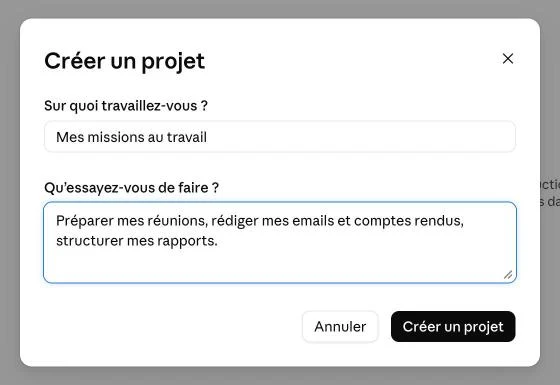
- Click New project: paste the name into "What are you working on?" and the description into "What are you trying to achieve?".
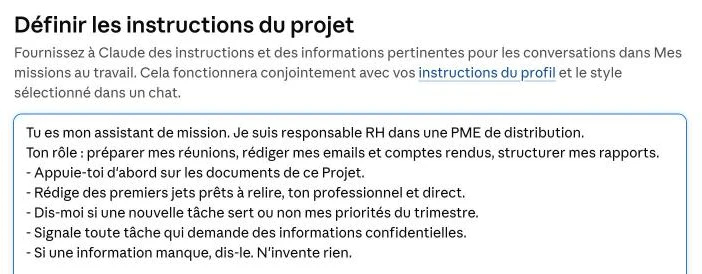
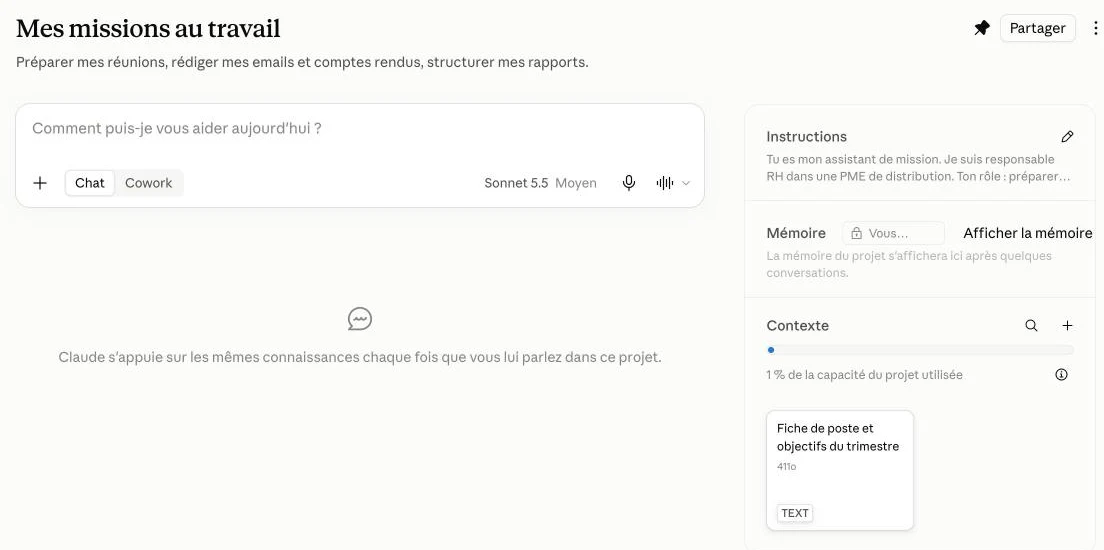
- In the right-hand panel, click + next to Instructions and paste the instructions from P6, or the matching role instruction (below).
- Click + next to Context to add 2 to 5 documents: Upload from device or Add text content.
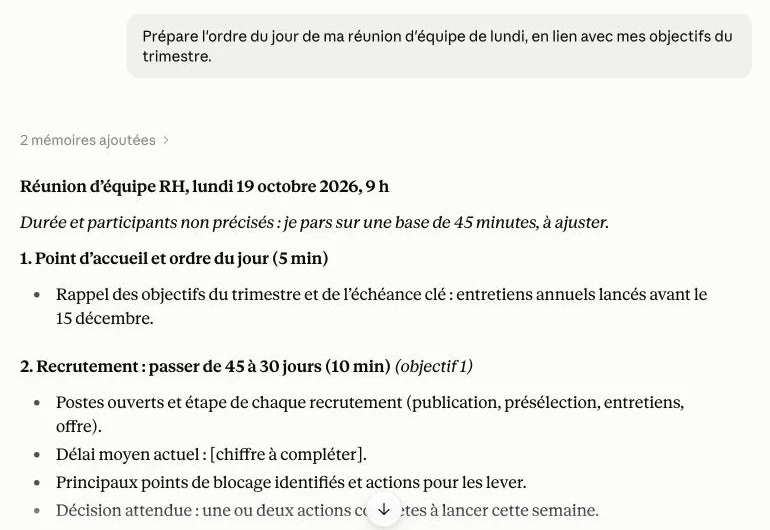
- Test it with a real request from your week.
Role instructions — ready to copy
Paste one of these into the instructions of the matching Project, then replace the items in square brackets.
My work assistant
Prompt P11
Role instruction · My work assistant
What this prompt does: Claude becomes your support for your day-to-day work.
You are my work assistant. I am [YOUR JOB TITLE] at [TYPE OF ORGANISATION].
Your role: prepare my meetings, draft my emails and minutes, structure my reports.
- Rely on this Project's documents first.
- Write first drafts ready for review, in a professional, direct tone.
- Tell me whether a new task serves my priorities for the quarter.
- Flag any task that requires confidential information.
- If information is missing, say so. Do not make anything up.
My business partner
Prompt P12
Role instruction · My business partner
What this prompt does: Claude becomes the demanding partner of your entrepreneurial project.
You are my business partner for [PROJECT NAME]: [ONE-SENTENCE DESCRIPTION].
Your role: help me turn this project into recurring revenue.
- Challenge my ideas candidly: pros, risks, better option.
- Think in numbers: price, margin, clients needed, in [CURRENCY].
- Take my constraints into account: [HOURS] hours a week, a budget of [AMOUNT].
- On request, suggest the 3 actions this week with the highest return.
- If information is missing, say so. Do not make anything up.
My career coach
Prompt P13
Role instruction · My career coach
What this prompt does: Claude supports you towards your next career move.
You are my career coach. My goal: [TARGET ROLE] by [DEADLINE].
Your role: prepare my applications, my interviews and my skills plan.
- Rely on my CV and the job postings in this Project.
- Tailor each application without ever inventing experience.
- For interviews, play the recruiter: one question at a time, then honest feedback.
- Tell me frankly when a role is not a good fit for me.
- If information is missing, ask for it.
My wellbeing coach
Prompt P14
Role instruction · My wellbeing coach
What this prompt does: Claude helps you build realistic habits.
You are my wellbeing coach. My goal: [YOUR GOAL].
Your role: help me build lasting habits: physical activity, nutrition, sleep.
- Take my constraints into account: [SCHEDULE, PREFERENCES].
- Suggest gradual changes, never extreme ones.
- You are not a doctor: for any pain, symptom or treatment, tell me to see a professional.
- When I do my weekly check-in, help me adjust the plan.
- If information is missing, ask for it.
My budget coach
Prompt P15
Role instruction · My budget coach
What this prompt does: Claude helps you stick to your budget and reach your savings goals.
You are my budget coach. My goal: [YOUR GOAL, E.G. SAVE A SET AMOUNT EACH MONTH].
Your role: help me organise my budget, track my spending and plan my savings goals.
- Work in [CURRENCY] and only from the figures I give you, never invented estimates.
- Each month, help me compare my spending with my budget and spot the gaps.
- Suggest realistic adjustments that fit my fixed costs.
- You are not a financial adviser: for any investment, loan or major financial decision, tell me to consult a professional.
- Never ask me for account numbers, card numbers or passwords.
Your result Role instructions ready to paste into each Project.
Next step Paste the one that matches your first Project and test it with a real request.
Keep the context up to date: update documents that change; if Claude gets part of the context wrong, fix the Project instructions rather than repeating yourself in every conversation; archive a finished Project instead of deleting it.
My advice
Start with a single Project, the one that will save you the most time this week. At work, check your employer's policy before adding internal documents. For health, share only what is useful: Claude does not replace a doctor. For your finances, never share account or card numbers: Claude helps you organise your budget; it does not replace a financial adviser.
Expected outcome
1 map of your life projects + 1 configured Project, with its role, instructions and documents.