
What you will get
your priority tools identified, and a first connector enabled safely.
With a connector, Claude fetches information where it lives, instead of you copying it in. You choose what you connect, and what Claude is allowed to do.
Real example
Notion as the source of truth
Notion is the central workspace for my projects. I ask Claude to check my meeting notes before recommending anything. My rule: if the information is not in Notion, it tells me so, and it never claims to have checked Notion when it has not.
Three safety habits
- Only connect what you use. One tool per real need, not all your accounts "just in case".
- Read the authorisation screen. Check what Claude will be able to read, and whether it can also write, send or edit.
- Clean up. Disconnect a tool you no longer use: Customize → Connectors.
Where to start? Run P9 to find out which tools to connect, and with which permissions.
Prompt P9
Connect my tools
What this prompt does: Claude identifies the useful connections, with their permissions and limits.
Help me connect my work tools to Claude, safely.

First, ask me, all at once:
1. The tools I use every day.
2. The ones that hold information I often need.
3. My Claude plan, if I know it.
4. Personal account, or an account managed by my company?

Then, for up to 5 tools:
<format>
TOOL:
How it would help me: 1 example request
Availability: connector offered, or "to check in the connector list"
Steps and authorisation to give
Permissions: what Claude will be able to read or do
Limits and precautions
</format>
Then, in 2 lines: which tool to start with.

Never say a tool is connected unless you have checked it or I have confirmed it. If my account is managed by my company, remind me that an administrator may need to enable the connector.
Your result A connection plan for your key tools.
Next step Connect the recommended tool, then test it with a real request.
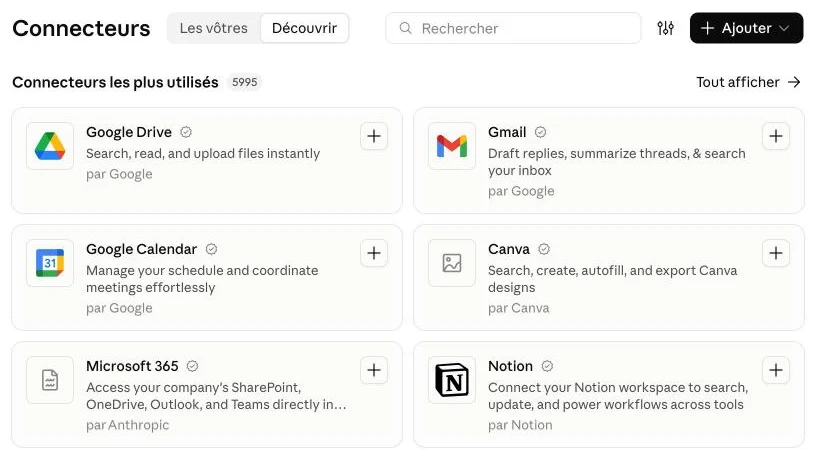
Connect a tool: left sidebar → Customize → Connectors → Discover tab → + on the chosen tool → read the permissions requested → authorise → test. To remove access, disconnect the tool in the same place. On a Team or Enterprise account, the administrator often needs to enable the connector first.
Your turn
connect one tool only, the one Claude recommends, and test it: "Find the latest document on [topic] in my Drive and summarise it in 5 points."
Expected outcome
1 tool connected and tested, with permissions you understand.